Thursday, August 21, 2014
Query for user tables without Primary Keys
SELECT sch.name AS SchemaName, obj.name AS TableName
FROM sys.objects obj
INNER JOIN sys.schemas sch
ON obj.schema_id = sch.schema_id
LEFT JOIN sys.objects pk
ON pk.type = 'PK'
AND pk.parent_object_id = obj.object_id
WHERE obj.is_ms_shipped = 0
AND pk.object_id IS NULL
AND obj.type = 'U'

Monday, July 7, 2014
DMV query to find current executing command of a session
SELECT er.session_id,
er.status,
er.command,
er.cpu_time,
er.total_elapsed_time,
sqltext.TEXT
FROM sys.dm_exec_requests er
CROSS APPLY sys.dm_exec_sql_text(sql_handle) AS sqltext
where er.session_id = -- Your Session ID here
Tuesday, June 25, 2013
Stored Procedure to kill all database sessions
I am sure a lot of us would have seen that "database in use" error while restoring database over an existing database or detaching a database. The stored proc in this
post will help with this situation. You can use it to kill all the sessions in the database. It takes database name as a parameter.
SET NOCOUNT ON
DECLARE @killStr NVARCHAR(4000);
WITH killList (killStr)
AS(
SELECT ' KILL ' + CAST(spid AS VARCHAR(5)) + CHAR(10) FROM master..sysprocesses
WHERE dbid = db_id(@databaseName)
FOR XML PATH(''), TYPE
)
CREATE PROCEDURE [dbo].[vspKillDBSessions]
(
@databaseName VARCHAR(200)
)
AS
AS
SET NOCOUNT ON
DECLARE @killStr NVARCHAR(4000);
WITH killList (killStr)
AS(
SELECT ' KILL ' + CAST(spid AS VARCHAR(5)) + CHAR(10) FROM master..sysprocesses
WHERE dbid = db_id(@databaseName)
FOR XML PATH(''), TYPE
)
SELECT @killStr = CAST (killStr AS NVARCHAR(4000) ) FROM killList;
EXEC sp_executesql @killStr
Monday, June 27, 2011
Firewall configuration for a SQL Server 2008 Analysis Services Named Instance
1. Open TCP port 2382. This port is used by SQL Browser to handle instance name resolution for OLAP.
2. If Analysis Services is configured for dynamic port (default configuration), then add Analysis Services to firewall exception list.Find the path name of msmdsrv.exe, usually it will be below -
C:\Program Files\Microsoft SQL Server\MSAS10.{Instance Name}\OLAP\bin\msmdsrv.exe
Add above to the firewall exception list. This will enable AS to communicate with clients on any port it’s running on through SQL Browser.
If Analysis Services is configured to listen on a fixed port, then instead of adding msmdsrv.exe to exclusion list, open the inbound communication for the TCP port.
2. If Analysis Services is configured for dynamic port (default configuration), then add Analysis Services to firewall exception list.Find the path name of msmdsrv.exe, usually it will be below -
C:\Program Files\Microsoft SQL Server\MSAS10.{Instance Name}\OLAP\bin\msmdsrv.exe
Add above to the firewall exception list. This will enable AS to communicate with clients on any port it’s running on through SQL Browser.
If Analysis Services is configured to listen on a fixed port, then instead of adding msmdsrv.exe to exclusion list, open the inbound communication for the TCP port.
Firewall configuration for SQL 2008/2005 Named Instance
1. Open TCP and UDP port 1434. UDP port 1434 is used by SQL Browser to handle instance name resolution for SQL Server. TCP Port 1434 is used for SQL server dedicated Admin connections.
2. If SQL Server has been configured for dynamic port (Default configuration) then add SQL server service to firewall exception list. Find the path name of sqlserver.exe, usually it will be below (Standard install)-
C:\Program Files\Microsoft SQL Server\MSSQL10.{Instance Name}\MSSQL\Binn\sqlservr.exe
Add above to the firewall exception list. This will enable SQL server to communicate with clients on any port it’s running on through SQL Browser.
If SQL Server is configured to listen on a fixed port, then instead of adding sqlservr.exe to the exception list, you can open the Inbound communication for the TCP port.
2. If SQL Server has been configured for dynamic port (Default configuration) then add SQL server service to firewall exception list. Find the path name of sqlserver.exe, usually it will be below (Standard install)-
C:\Program Files\Microsoft SQL Server\MSSQL10.{Instance Name}\MSSQL\Binn\sqlservr.exe
Add above to the firewall exception list. This will enable SQL server to communicate with clients on any port it’s running on through SQL Browser.
If SQL Server is configured to listen on a fixed port, then instead of adding sqlservr.exe to the exception list, you can open the Inbound communication for the TCP port.
Monday, February 8, 2010
Dedicated Admin Connection feature for SQL 2005/2008
DBAs would run into situations where SQL server becomes unresponsive to the point that it doesn't allow new connections. Since we cannot login , we won't be able to figure out the rouge query (or queries :-)) that caused the problem.
SQL 2008 & 2005 allow you to connect to the sql server even under these circumstances using a Dedicated Admin Connection (or DAC).
To use it, you would need to first enbale it using below statements -
sp_configure 'REMOTE ADMIN CONNECTIONS', 1;
GO
RECONFIGURE;
GO
Then connect to the server using SSMS new query Or SqlCmd. You will have to use 'ADMIN:' before the server name. For example if your server name is xyz,
then for DAC connection the server name would be ADMIN:xyz
DAC connection doesn't work with SSMS object explorer and only 1 DAC connection is allowed at a time.
SQL 2008 & 2005 allow you to connect to the sql server even under these circumstances using a Dedicated Admin Connection (or DAC).
To use it, you would need to first enbale it using below statements -
sp_configure 'REMOTE ADMIN CONNECTIONS', 1;
GO
RECONFIGURE;
GO
Then connect to the server using SSMS new query Or SqlCmd. You will have to use 'ADMIN:' before the server name. For example if your server name is xyz,
then for DAC connection the server name would be ADMIN:xyz
DAC connection doesn't work with SSMS object explorer and only 1 DAC connection is allowed at a time.
Thursday, February 4, 2010
DMV Query For Current Executing SQL Statement
Often times for troublshooting a running big batch of query (for example a migration script) you would need to know the current sql statement executing. You can use below query after identifying the session id (spid) for the batch :
SELECT SUBSTRING(t.[text],
1+(r.statement_start_offset/2),
1+(
(
CASE r.statement_end_offset
WHEN -1 THEN DATALENGTH(t.[text])
ELSE r.statement_end_offset
END - r.statement_start_offset
)/2
)
)
FROM
sys.dm_exec_sessions s LEFT JOIN
sys.dm_exec_requests r ON (r.session_id = s.session_id) CROSS APPLY
sys.dm_exec_sql_text(r.sql_handle) t
WHERE r.session_id = ? /* Session id that you need to investigate */
SELECT SUBSTRING(t.[text],
1+(r.statement_start_offset/2),
1+(
(
CASE r.statement_end_offset
WHEN -1 THEN DATALENGTH(t.[text])
ELSE r.statement_end_offset
END - r.statement_start_offset
)/2
)
)
FROM
sys.dm_exec_sessions s LEFT JOIN
sys.dm_exec_requests r ON (r.session_id = s.session_id) CROSS APPLY
sys.dm_exec_sql_text(r.sql_handle) t
WHERE r.session_id = ? /* Session id that you need to investigate */
Monday, May 11, 2009
Agents Runnig fine but red X in replication monitor
Recently came accross a problem in a non prod environment where replication replication monitor was marked with red X. It was a SQL 2000 server and replication agents were running fine without error. Server had undergone restores from prod backups and replication was rebuilt after the restores. One of my collegue found the solution in http://www.replicationanswers.com.
Running sp_MSload_replication_status did the trick.
The link has solution for SQL 2005 as well.
Running sp_MSload_replication_status did the trick.
The link has solution for SQL 2005 as well.
Wednesday, February 11, 2009
SQL 2008 Replication - debugging distributor agent error message
Check details of the replication error using replication monitor. For example, in case of a general no row found error at subscriber, we would find error description of something like below -
Command attempted:
if @@trancount > 0 rollback tran
(Transaction sequence number: 0x000019A0000032DF000800000000, Command ID: 1)
Error messages:
• The row was not found at the Subscriber when applying the replicated command. (Source: MSSQLServer, Error number: 20598)
Get help: http://help/20598
The row was not found at the Subscriber when applying the replicated command. (Source: MSSQLServer, Error number: 20598)
Get help: http://help/20598
Error doesn’t give the name of the table or the command text that resulted in this failure. Below are two ways to get this
information –
1. sp_browsereplcmds
In order to use this, we will need to know values for @xact_seqno_start ,@xact_seqno_end ,@publisher_database_id ,@article_id ,@command_id
@xact_seqno_start and @xact_seqno_end would be the same as we would be using @command_id.
Error message doesn’t give us the @publisher_database_id or @article_id, so we need to find it out.
Below querries should give us @article_id and @publisher_database_id
use distribution
go
select * from MSrepl_commands
where command_id = 1 /* from replication monitor*/
go
select * from MSpublisher_databases
once we get all variables we can execute the proc
sp_browsereplcmds @xact_seqno_start = '0x000019a0000032e50008'
,@xact_seqno_end = '0x000019a0000032e50008'
,@publisher_database_id = 1
,@article_id = 1
,@command_id= 1
In the above example, I get below value for command column -
{CALL [dbo].[sp_MSupd_dboPerson] (,'test',,,,,,,,,72328,0x0200)}
Person is the table name (part of the replication Proc name), 'test' is the changed value of second column for Primary Key Value of 72328
2.Using ‘OutputVerboseLevel’ and ‘Output’ options of Distribution agent
We can set distribution agent to log to a file with ‘OutputVerboseLevel’ value of ‘2’. This will log both error messages as progress report. I would suggest using this for debugging purpose only. ‘0’ doesn’t
seem to give detailed error message in SQL 2008 (RTM).
For the Distribution Job ‘Run Agent’ step add below two options
-Output C:\ReplDistbOutput.txt -OutputVerboseLevel 2
Here’s the portion of the log file -
2009-02-12 00:49:58.668 Last transaction timestamp: 0x000019a0000032df000800000000
Transaction seqno: 0x000019a0000032e50008
Command Id: 1
Partial: 0
Type: 30
Command: <>
2009-02-12 00:49:58.684 sp_MSget_repl_commands timestamp returned: 0x0x000019a0000032e500085a87a1e7, 2, local rowcount: 2
2009-02-12 00:49:58.699
42000 The row was not found at the Subscriber when applying the replicated command. 20598
2009-02-12 00:49:58.699 sp_MSget_repl_commands timestamp value is: 0x0x000019a0000032e5000800000000
2009-02-12 00:49:58.715
42000 The row was not found at the Subscriber when applying the replicated command. 20598
2009-02-12 00:49:58.762
Failed command = {CALL [dbo].[sp_MSupd_dboPerson] (,?,,,,,,,,,?,0x0200)} {CALL [dbo].[sp_MSupd_dboPerson] (,?,,,,,,,,,?,0x0200)}
2009-02-12 00:49:58.777 Parameterized values for above command(s): {{'dl1fh1l', 72328}, {'dl1fh111l', 72328}}
2009-02-12 00:49:58.809 Disconnecting from Subscriber 'SHAMSH\ECM1'
2009-02-12 00:49:58.824 Disconnecting from OLE DB Subscriber 'SHAMSH\ECM1'
Command attempted:
if @@trancount > 0 rollback tran
(Transaction sequence number: 0x000019A0000032DF000800000000, Command ID: 1)
Error messages:
• The row was not found at the Subscriber when applying the replicated command. (Source: MSSQLServer, Error number: 20598)
Get help: http://help/20598
The row was not found at the Subscriber when applying the replicated command. (Source: MSSQLServer, Error number: 20598)
Get help: http://help/20598
Error doesn’t give the name of the table or the command text that resulted in this failure. Below are two ways to get this
information –
1. sp_browsereplcmds
In order to use this, we will need to know values for @xact_seqno_start ,@xact_seqno_end ,@publisher_database_id ,@article_id ,@command_id
@xact_seqno_start and @xact_seqno_end would be the same as we would be using @command_id.
Error message doesn’t give us the @publisher_database_id or @article_id, so we need to find it out.
Below querries should give us @article_id and @publisher_database_id
use distribution
go
select * from MSrepl_commands
where command_id = 1 /* from replication monitor*/
go
select * from MSpublisher_databases
once we get all variables we can execute the proc
sp_browsereplcmds @xact_seqno_start = '0x000019a0000032e50008'
,@xact_seqno_end = '0x000019a0000032e50008'
,@publisher_database_id = 1
,@article_id = 1
,@command_id= 1
In the above example, I get below value for command column -
{CALL [dbo].[sp_MSupd_dboPerson] (,'test',,,,,,,,,72328,0x0200)}
Person is the table name (part of the replication Proc name), 'test' is the changed value of second column for Primary Key Value of 72328
2.Using ‘OutputVerboseLevel’ and ‘Output’ options of Distribution agent
We can set distribution agent to log to a file with ‘OutputVerboseLevel’ value of ‘2’. This will log both error messages as progress report. I would suggest using this for debugging purpose only. ‘0’ doesn’t
seem to give detailed error message in SQL 2008 (RTM).
For the Distribution Job ‘Run Agent’ step add below two options
-Output C:\ReplDistbOutput.txt -OutputVerboseLevel 2
Here’s the portion of the log file -
2009-02-12 00:49:58.668 Last transaction timestamp: 0x000019a0000032df000800000000
Transaction seqno: 0x000019a0000032e50008
Command Id: 1
Partial: 0
Type: 30
Command: <
2009-02-12 00:49:58.684 sp_MSget_repl_commands timestamp returned: 0x0x000019a0000032e500085a87a1e7, 2, local rowcount: 2
2009-02-12 00:49:58.699
42000 The row was not found at the Subscriber when applying the replicated command. 20598
2009-02-12 00:49:58.699 sp_MSget_repl_commands timestamp value is: 0x0x000019a0000032e5000800000000
2009-02-12 00:49:58.715
42000 The row was not found at the Subscriber when applying the replicated command. 20598
2009-02-12 00:49:58.762
Failed command = {CALL [dbo].[sp_MSupd_dboPerson] (,?,,,,,,,,,?,0x0200)} {CALL [dbo].[sp_MSupd_dboPerson] (,?,,,,,,,,,?,0x0200)}
2009-02-12 00:49:58.777 Parameterized values for above command(s): {{'dl1fh1l', 72328}, {'dl1fh111l', 72328}}
2009-02-12 00:49:58.809 Disconnecting from Subscriber 'SHAMSH\ECM1'
2009-02-12 00:49:58.824 Disconnecting from OLE DB Subscriber 'SHAMSH\ECM1'
Saturday, November 8, 2008
Using SQL 2008 Change Data Capture (CDC)
SQL 2008 has a new feature called Change Data Capture (CDC). When enabled for a table it stores before and after values of the tracked columns in a change tracking table.
1. Enabling CDC for a database
To capture data changes for a table we need to first enable change tracking at database level. Execute the following script to enable CDC for the database.
use 'YourDBName'
go
exec sys.sp_cdc_enable_db
2. Setting CDC for the table
Use sys.sp_cdc_enable_table for a table to set CDC. By default, all
columns are tracked. We can strict CDC to specific columns by specifying column names for parameter ‘@captured_column_list’
exec sys.sp_cdc_enable_table
@source_schema = 'dbo'
,@source_name = 'Person'
,@role_name = 'rptrole'
,@capture_instance = 'Person'
/* This will create a change tracking table cdc.dbo_Person_CT */
,@supports_net_changes = 1
/* Indicates if support for quering net changes are allowed or not
allow = 1 */
,@index_name = 'PK_Person_PersonID'
/* change tracking requires a unique index to track changes against*/
,@captured_column_list
= 'Address1,Address2,City,State,Zip,PhoneNo,PersonID'
/* Changes will be tracked for columns mentioned in this parameter.
Default is all*/
,@filegroup_name = 'cdc'
/*file group where cdc objects will be created It’s a good practice to
create separate filegroup for CDC.Place the filegroup in a different
Drive to minimize impact on I/O
*/
-- ,@partition_switch = 'partition_switch'
/* Indicates if switch partition command is allowed or not.
applicable to patitioned tables only*/
3. Retrieving Change
Change data for the above example would be stored in cdc.dbo_Person_CT.It can be used in conjunction with cdc.lsn_time_mapping table to retrieve data for a time period. CDC provides functions for change retrievel as well.
Get Start LSN –
sys.fn_cdc_map_time_to_lsn('smallest greater than or equal', @begin_time)
Get End LSN -
sys.fn_cdc_map_time_to_lsn('largest less than or equal', @end_time)
Get net changes for the LSN range (shows only final content of a row for the range)
SELECT * FROM cdc.fn_cdc_get_net_changes_dbo_Person(Start LSN, End LSN,'all');
Get all changes for the LSN range (shows all changes for a row in the LSN range)
SELECT * FROM cdc.fn_cdc_get_all_changes_dbo_Person(Start LSN, End LSN,'all');
4. CDC Jobs
CDC creates a capture and cleanup job. Use the below SQL to see job configuration.
exec sys.sp_cdc_help_jobs
By default cleanup job is configured to retain up to 72 hrs changes and capture job is set to run continuously.
We can use sys.sp_cdc_change_job to modify the configuration of cdc jobs.
1. Enabling CDC for a database
To capture data changes for a table we need to first enable change tracking at database level. Execute the following script to enable CDC for the database.
use 'YourDBName'
go
exec sys.sp_cdc_enable_db
2. Setting CDC for the table
Use sys.sp_cdc_enable_table for a table to set CDC. By default, all
columns are tracked. We can strict CDC to specific columns by specifying column names for parameter ‘@captured_column_list’
exec sys.sp_cdc_enable_table
@source_schema = 'dbo'
,@source_name = 'Person'
,@role_name = 'rptrole'
,@capture_instance = 'Person'
/* This will create a change tracking table cdc.dbo_Person_CT */
,@supports_net_changes = 1
/* Indicates if support for quering net changes are allowed or not
allow = 1 */
,@index_name = 'PK_Person_PersonID'
/* change tracking requires a unique index to track changes against*/
,@captured_column_list
= 'Address1,Address2,City,State,Zip,PhoneNo,PersonID'
/* Changes will be tracked for columns mentioned in this parameter.
Default is all*/
,@filegroup_name = 'cdc'
/*file group where cdc objects will be created It’s a good practice to
create separate filegroup for CDC.Place the filegroup in a different
Drive to minimize impact on I/O
*/
-- ,@partition_switch = 'partition_switch'
/* Indicates if switch partition command is allowed or not.
applicable to patitioned tables only*/
3. Retrieving Change
Change data for the above example would be stored in cdc.dbo_Person_CT.It can be used in conjunction with cdc.lsn_time_mapping table to retrieve data for a time period. CDC provides functions for change retrievel as well.
Get Start LSN –
sys.fn_cdc_map_time_to_lsn('smallest greater than or equal', @begin_time)
Get End LSN -
sys.fn_cdc_map_time_to_lsn('largest less than or equal', @end_time)
Get net changes for the LSN range (shows only final content of a row for the range)
SELECT * FROM cdc.fn_cdc_get_net_changes_dbo_Person(Start LSN, End LSN,'all');
Get all changes for the LSN range (shows all changes for a row in the LSN range)
SELECT * FROM cdc.fn_cdc_get_all_changes_dbo_Person(Start LSN, End LSN,'all');
4. CDC Jobs
CDC creates a capture and cleanup job. Use the below SQL to see job configuration.
exec sys.sp_cdc_help_jobs
By default cleanup job is configured to retain up to 72 hrs changes and capture job is set to run continuously.
We can use sys.sp_cdc_change_job to modify the configuration of cdc jobs.
Saturday, October 11, 2008
Handling Upserts Using 'Slowly Changing Dimension' in SSIS
Many of us would have faced a scenario where we have to bring in records from a source and insert if records don't exist or update if exists (also referred to as Upserts).This can now easily be done using 'Slowly Changing Dimension' (SCD) in SSIS 2005/2008.
In my example, I have a dimension table called dimPerson in Datawarehouse DB - 'DWDB' and a source table called Person in OLTP database - 'OLPTSource'.
My aim is to transfer records from OLPTSource.Person to DWDB.dimPerson based on these rules:
- If PersonID exists in DWDB and if there is any difference/change in columns FName, MName, LName, Address1, Address2, City, State or Zip then update the row with changes.
- If PersonID exists in DWDB and Phone number differs then mark the record as outdated and insert a new record for the PersonID
- If PersonID doesn't exists in DWDB then insert record
For this example you will need to create OLTPSource and DWDB databases and run the following script:
1. Create a Sequence Container to hold Data Flow task. Drag and drop
a Data Flow Task. Create two OLEDB connections :
OLE DB Connection for datawarehouse database – DWDB
OLE DB Connection for OLTP source database - OLTPSource
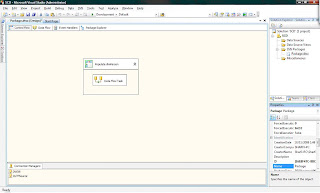
2. Go to Data Flow view and configure OLEDB data source to retrieve records from OLTPSource.Person table. Drag and drop ‘Slowly Changing Dimension’ item.
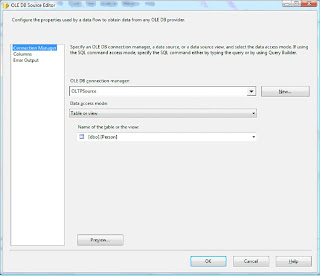
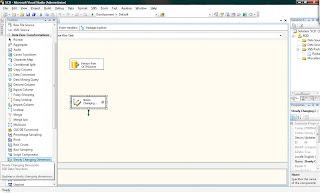
3. Double Click on SCD to bring up Wizard
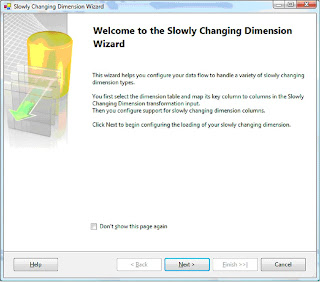
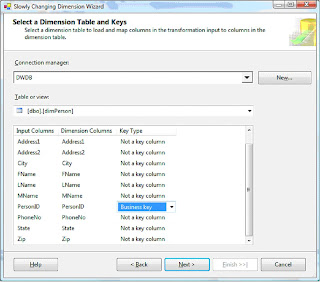
4. Select Key Type as ‘Business Key’ for PersonID
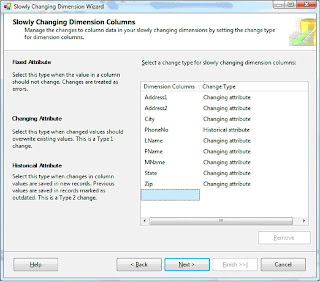
5. Select Change Type as ‘Historical Attribute’ for PhoneNo and ‘Changing Attribute’ for the rest.
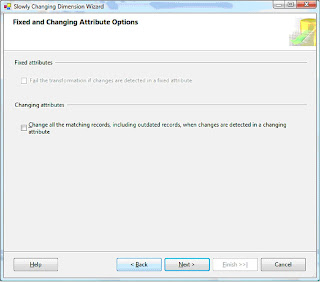
6. Don’t check any of the boxes in the below screen
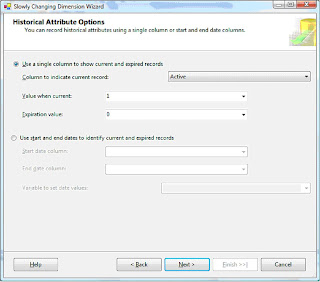
7. Select the column ‘Active’ to indicate current and expired rows. Enter 1 for current and 0 for expired value. If PhoneNo changes for a personID, then a new record will be inserted with a ‘Active’ column value of ‘1’. Old record will get the ‘Active’ column value updated to ‘0’.
8. Click finish on the next screen and you will notice that the wizard has updated items on the data flow view
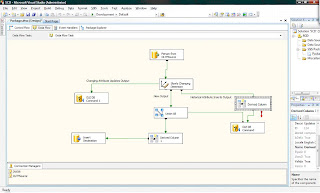
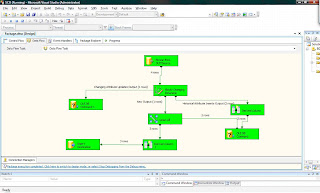
9. Excute the package. If you ran the whole script in http://docs.google.com/Doc?id=ddstdscf_0c653h9cm , then you will see a similar result as in screen below. There were two updates to PhoneNo column, that shows up as 2 rows in ‘Historical Attribute Inserts Output’. ‘New Output’ shows up as 1 row because of the one row inserted in the script. Finally, the ‘Change Attribute Updates Output’shows up as 1 because of the one update statement changing Zip and Addess1. Notice that the update statement for PhoneNo and Zip for PersonID =2didn’t change Zip for historical record (active =0). You can change this behaviour by setting UpdateChangingAttributeHistory to True.
Check below msdn link to find out what more on SCD:
http://msdn.microsoft.com/en-us/library/ms141715.aspx
In my example, I have a dimension table called dimPerson in Datawarehouse DB - 'DWDB' and a source table called Person in OLTP database - 'OLPTSource'.
My aim is to transfer records from OLPTSource.Person to DWDB.dimPerson based on these rules:
- If PersonID exists in DWDB and if there is any difference/change in columns FName, MName, LName, Address1, Address2, City, State or Zip then update the row with changes.
- If PersonID exists in DWDB and Phone number differs then mark the record as outdated and insert a new record for the PersonID
- If PersonID doesn't exists in DWDB then insert record
For this example you will need to create OLTPSource and DWDB databases and run the following script:
http://docs.google.com/Doc?id=ddstdscf_0c653h9cm
This will do the following –
- Create the two tables Person & dimPerson
- Populate Person & load dimPerson with Person records
- Update & insert statements to Person records to understand how SCD
handles these changes to source after the initial load of dimPerson
1. Create a Sequence Container to hold Data Flow task. Drag and drop
a Data Flow Task. Create two OLEDB connections :
OLE DB Connection for datawarehouse database – DWDB
OLE DB Connection for OLTP source database - OLTPSource

2. Go to Data Flow view and configure OLEDB data source to retrieve records from OLTPSource.Person table. Drag and drop ‘Slowly Changing Dimension’ item.


3. Double Click on SCD to bring up Wizard

4. Select Key Type as ‘Business Key’ for PersonID

5. Select Change Type as ‘Historical Attribute’ for PhoneNo and ‘Changing Attribute’ for the rest.

6. Don’t check any of the boxes in the below screen

7. Select the column ‘Active’ to indicate current and expired rows. Enter 1 for current and 0 for expired value. If PhoneNo changes for a personID, then a new record will be inserted with a ‘Active’ column value of ‘1’. Old record will get the ‘Active’ column value updated to ‘0’.

8. Click finish on the next screen and you will notice that the wizard has updated items on the data flow view


9. Excute the package. If you ran the whole script in http://docs.google.com/Doc?id=ddstdscf_0c653h9cm , then you will see a similar result as in screen below. There were two updates to PhoneNo column, that shows up as 2 rows in ‘Historical Attribute Inserts Output’. ‘New Output’ shows up as 1 row because of the one row inserted in the script. Finally, the ‘Change Attribute Updates Output’shows up as 1 because of the one update statement changing Zip and Addess1. Notice that the update statement for PhoneNo and Zip for PersonID =2didn’t change Zip for historical record (active =0). You can change this behaviour by setting UpdateChangingAttributeHistory to True.

Check below msdn link to find out what more on SCD:
http://msdn.microsoft.com/en-us/library/ms141715.aspx
Tuesday, August 5, 2008
IF Exists #tempTable
Lot of us would be using 'like' clause to check for existence of a local or global temp table.
if exists ( select name from sys.objects
where type = 'U' and
name like '##temptable%')
Drop table ##temptable
...
...
...
Create script for ##temptable
...
...
This code will run into problem if some other user connection is already having its own global temp table ##temptablex. Connection runnning the above script will try to drop the table since if exists condition evaluates to true and error out.
One way to avoid this is by checking object id for the temp table -
if (OBJECT_ID ('tempdb..##tempTable') is not null )
if exists ( select name from sys.objects
where type = 'U' and
name like '##temptable%')
Drop table ##temptable
...
...
...
Create script for ##temptable
...
...
This code will run into problem if some other user connection is already having its own global temp table ##temptablex. Connection runnning the above script will try to drop the table since if exists condition evaluates to true and error out.
One way to avoid this is by checking object id for the temp table -
if (OBJECT_ID ('tempdb..##tempTable') is not null )
SQL 2008 Data Collector
SQL 2008 has a new feature called ‘Data Collector’. Data Collector monitors server and database performance. It comes with built in reports for the collection sets. We can setup a collection for SQL servers that will collect performance data at a central repository. This data can be used for troubleshooting performance issues and to see how the server is scaling. I did see some bugs with reports in RC 0, but they can be worked around.
Here’s how you can navigate to Data Collection -
SQL Server Management Studio > Object Explorer > Management > Data Collection
It ships with three collection sets –
Disk Usage
Query Statistics
Server Activity
Disk Usage collection set gives statistics around database files. For Data/Log files you can see Auto Grow, Auto Shrink events, file growth trends, growth rates, disk space used by DB files etc.
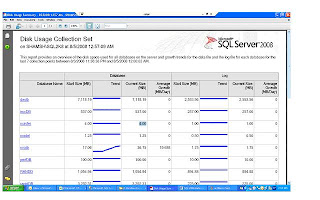
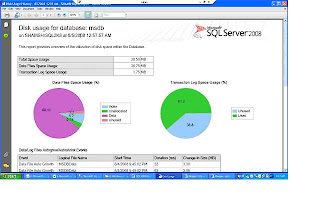
Here’s how you can navigate to Data Collection -
SQL Server Management Studio > Object Explorer > Management > Data Collection
It ships with three collection sets –
Disk Usage
Query Statistics
Server Activity
Disk Usage collection set gives statistics around database files. For Data/Log files you can see Auto Grow, Auto Shrink events, file growth trends, growth rates, disk space used by DB files etc.


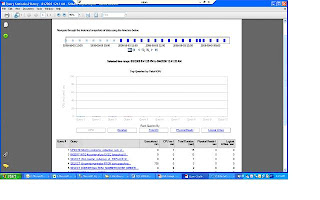
Query Statistics collection set gives statistics for queries that ran on the server. This was possible in SQL 2005 as well through DMVs(sys.dm_exec_query_stats, sys.dm_exec_sql_text, sys.dm_exec_query_plan ).
You can see following query stats on the report -
Executions /Min,
CPU ms/sec,
Total duration,
Physical reads/sec,
logical writes/sec
You can see following query stats on the report -
Executions /Min,
CPU ms/sec,
Total duration,
Physical reads/sec,
logical writes/sec

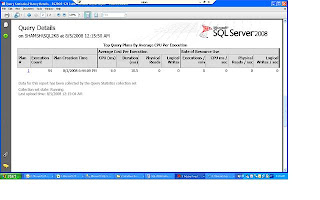
Click on a query to see details. You can then see waits by clicking ‘view sampled waits for this query’
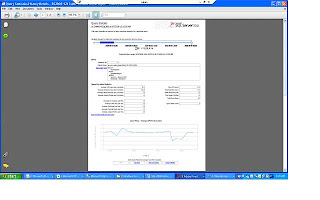
Click on plan ids to see graphical execution plan.

Click on plan ids to see graphical execution plan.

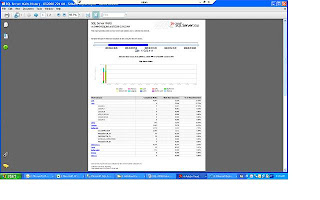
Server Activity collection set collects data for % CPU , Memory Usage , Disk I/O Usage , Network Usage, SQL Server Waits and SQL Server Activity. You can click on the individual graphs on the main report to get more detailed information. For example, you can drill down to different lock types for SQL server Waits collection.
Just a caution before you decide on implementing this on prod…You should give due consideration to collection interval and data retention properties to keep it from having an impact on performance. I would suggest testing it out in a load test environment and see its resource usage.

Just a caution before you decide on implementing this on prod…You should give due consideration to collection interval and data retention properties to keep it from having an impact on performance. I would suggest testing it out in a load test environment and see its resource usage.
Wednesday, July 23, 2008
Auto Update Statistics DB Option
On my very first week at work, I had to work on a production problem that had been lingering over for a while. Users were reporting sporadic application timeouts and slowness. Perfmon Data, SQL sever logs, server event logs were all clean indicating no hardware issues. Analysis of PSSDiag Blocking log and trace files showed Auto update stats getting kicked off at the problem times.
SQL server starts Auto update stats when data modification for a table is more than 20 %. Auto update stats can degrade performance especially if the table in question is big.
Consider to turn this option off if this DB option becomes a problem for you.If you decide to turn this option off then handle update statistics through a scheduled maintenance job. We can look at rowmodctr column in sysindexes to get an idea on how many modification were made after stats were last updated. If you are running SQL 2005 or SQL 2008 try out Asyncronous Auto update stats option (AUTO_UPDATE_STATISTICS_ASYNC{ONOFF})
I didn’t have the luxury of this feature as this was SQL2000. I ended up turning auto
Update stats off and having update stats run as part of maintenance.
Here’s what you would expect to see depending on the tool you use.
SQL Profiler: You would see ‘auto stats’ event class in trace files. If you import the trace files in a table then look for trace event id 58
Blocking log: In PSSDiag blocking log ( ServerName_instanceName_Run_sp_blocker_pss80.OUT)
You would see syslockinfo records like below
Spid ObjId Type Resource Mode Status
63 1893058136 TAB [UPD-STATS] Sch-M GRANT
SQL Error log: To have sql server log auto stats event in error log, run dbcc traceon (8721, -1)
You will see entries like below in the error log –
2008-05-19 23:40:51.66 spid72 AUTOSTATS: SUMMARY Tbl: DeviceEvents
Objid:1893058136 UpdCount: 12 Rows: 1124361 Mods: 124776 Bound: 225372 Duration: 5500ms LStatsSchema: 11
SQL server starts Auto update stats when data modification for a table is more than 20 %. Auto update stats can degrade performance especially if the table in question is big.
Consider to turn this option off if this DB option becomes a problem for you.If you decide to turn this option off then handle update statistics through a scheduled maintenance job. We can look at rowmodctr column in sysindexes to get an idea on how many modification were made after stats were last updated. If you are running SQL 2005 or SQL 2008 try out Asyncronous Auto update stats option (AUTO_UPDATE_STATISTICS_ASYNC{ONOFF})
I didn’t have the luxury of this feature as this was SQL2000. I ended up turning auto
Update stats off and having update stats run as part of maintenance.
Here’s what you would expect to see depending on the tool you use.
SQL Profiler: You would see ‘auto stats’ event class in trace files. If you import the trace files in a table then look for trace event id 58
Blocking log: In PSSDiag blocking log ( ServerName_instanceName_Run_sp_blocker_pss80.OUT)
You would see syslockinfo records like below
Spid ObjId Type Resource Mode Status
63 1893058136 TAB [UPD-STATS] Sch-M GRANT
SQL Error log: To have sql server log auto stats event in error log, run dbcc traceon (8721, -1)
You will see entries like below in the error log –
2008-05-19 23:40:51.66 spid72 AUTOSTATS: SUMMARY Tbl: DeviceEvents
Objid:1893058136 UpdCount: 12 Rows: 1124361 Mods: 124776 Bound: 225372 Duration: 5500ms LStatsSchema: 11
Subscribe to:
Posts (Atom)